Minimalist & Fast Interface
Instant startup and clean navigation, ideal for entry-level and mid-range Smart TVs.



Learn how to install and configure Home IPTV on your LG or Samsung Smart TV with your Tvsmarte subscription. Follow our simple step-by-step guide to pair your TV ID and upload your M3U playlist via the hp-iptv.com web portal.
A lightweight, clutter-free Smart TV app designed to stream your favorite channels smoothly without bogging down your television.
Instant startup and clean navigation, ideal for entry-level and mid-range Smart TVs.
Easily upload and manage your Tvsmarte playlist from your PC or phone without using your TV remote.
Automatic organization of channels by country and genre, complete with real-time TV guide data.
Följ varje detaljerat steg nedan för att konfigurera dina Tvsmarte-strömmar i Home IPTV.
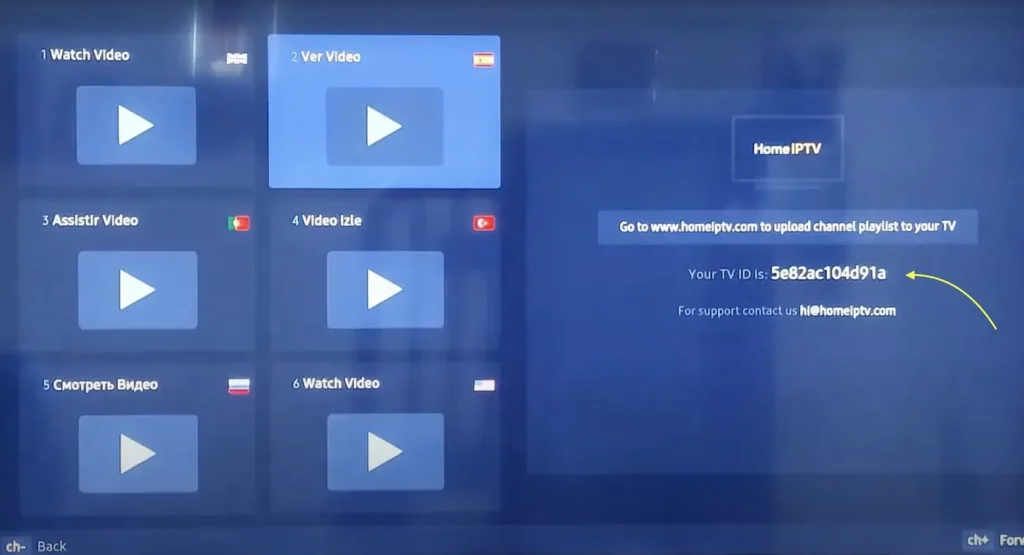
Install Home IPTV from the LG Content Store or Samsung Smart Hub. Launch the app: the main screen displays your unique device identifier labeled 'TV ID' or 'MAC Address'. Write this ID down carefully.
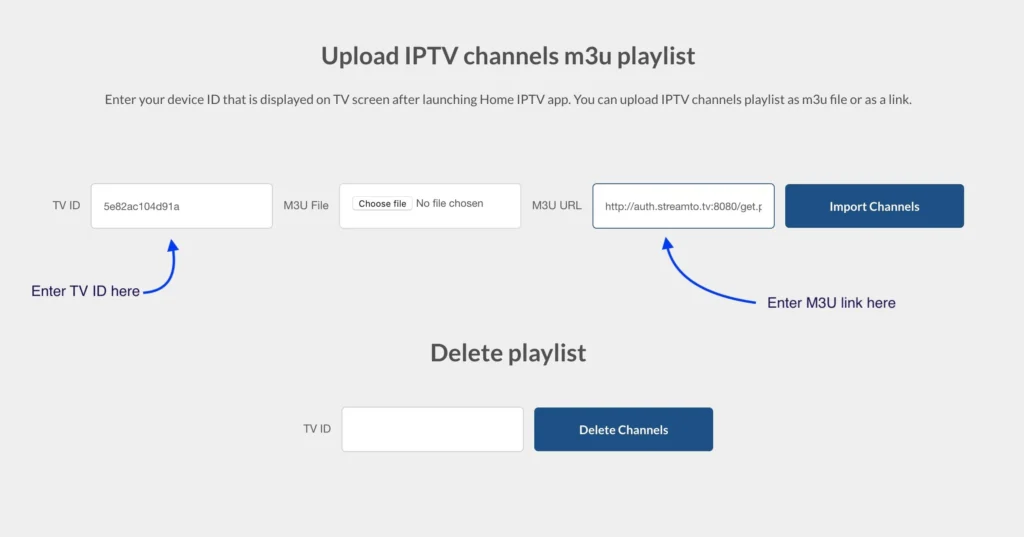
Open a web browser on your phone or PC and visit https://hp-iptv.com. In the upload form, enter your 'TV ID', paste your complete Tvsmarte M3U URL into the 'M3U URL' field, and click 'Upload' or 'Import'.
Once the success confirmation appears on the website, switch back to your TV. Click the 'Reload' button or restart Home IPTV. Your live Tvsmarte channels will automatically appear with the EPG.
Snabba lösningar som vårt team har verifierat för vanliga problem med Home IPTV.
Completely exit Home IPTV on your TV and relaunch it. If the issue persists, verify that you copied the complete M3U link without any trailing spaces.
Home IPTV offers a free trial. Once expired, a small one-time activation fee (approx. €5 to €6 for lifetime access) is required on the official site to continue using the service.
Inside the Home IPTV settings, lower the preferred video buffer or switch to FHD streams if your Internet speed fluctuates.
Allt du behöver veta om att använda Home IPTV med din prenumeration.
Yes, Home IPTV is available on Android TV via the Google Play Store, although it is most popular on LG and Samsung Smart TVs.
Yes, the hp-iptv.com portal allows you to add multiple M3U links under the same TV ID and switch between them anytime.
Yes, you can lock adult or sensitive categories with a 4-digit PIN directly in the Home IPTV settings.
Få dina Xtream Codes-uppgifter och din M3U-länk på under 5 minuter via e-post och WhatsApp. Testa riskfritt med vår 24 timmars pengarna-tillbaka-garanti.