Native Smart TV Integration
Built specifically for Samsung Tizen and LG webOS: Smart IPTV integrates flawlessly with your TV's original remote control.



Complete guide to installing and configuring the classic Smart IPTV app (SIPTV) on your Samsung, LG, or Android Smart TV with Tvsmarte. Follow our step-by-step tutorial to pair your MAC address and upload your 4K M3U playlist via the official siptv.app web portal.
The benchmark player for Smart TVs featuring ultra-fast zapping and seamless native integration on smart TVs.
Built specifically for Samsung Tizen and LG webOS: Smart IPTV integrates flawlessly with your TV's original remote control.
Enjoy silky-smooth channel changing powered by a playback engine finely tuned for smart TV processors.
Manage, update, or reset your channel playlist remotely without ever typing tedious URLs with your TV remote.
Ακολουθήστε κάθε αναλυτικό βήμα παρακάτω για να ρυθμίσετε τις ροές Tvsmarte στο Smart IPTV.
Install the Smart IPTV app from the LG Content Store (LG TVs) or Samsung Apps (Samsung TVs). Open the app: the welcome screen displays your physical MAC address formatted as XX:XX:XX:XX:XX:XX (e.g., 00:1a:79:xx:xx:xx). Note down this address carefully.
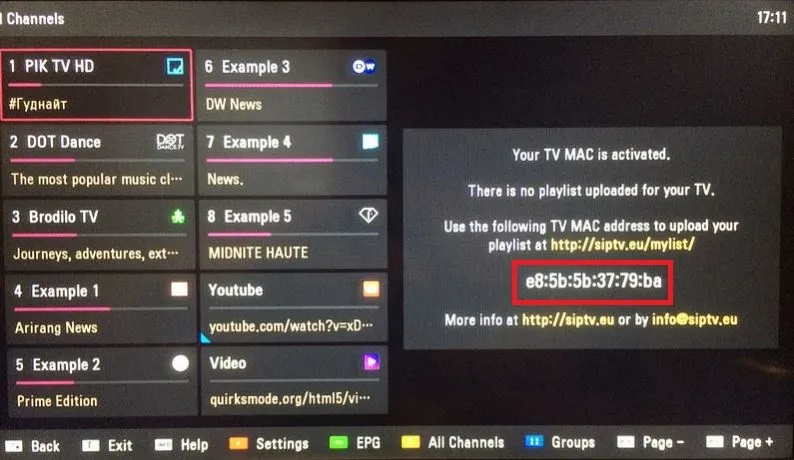
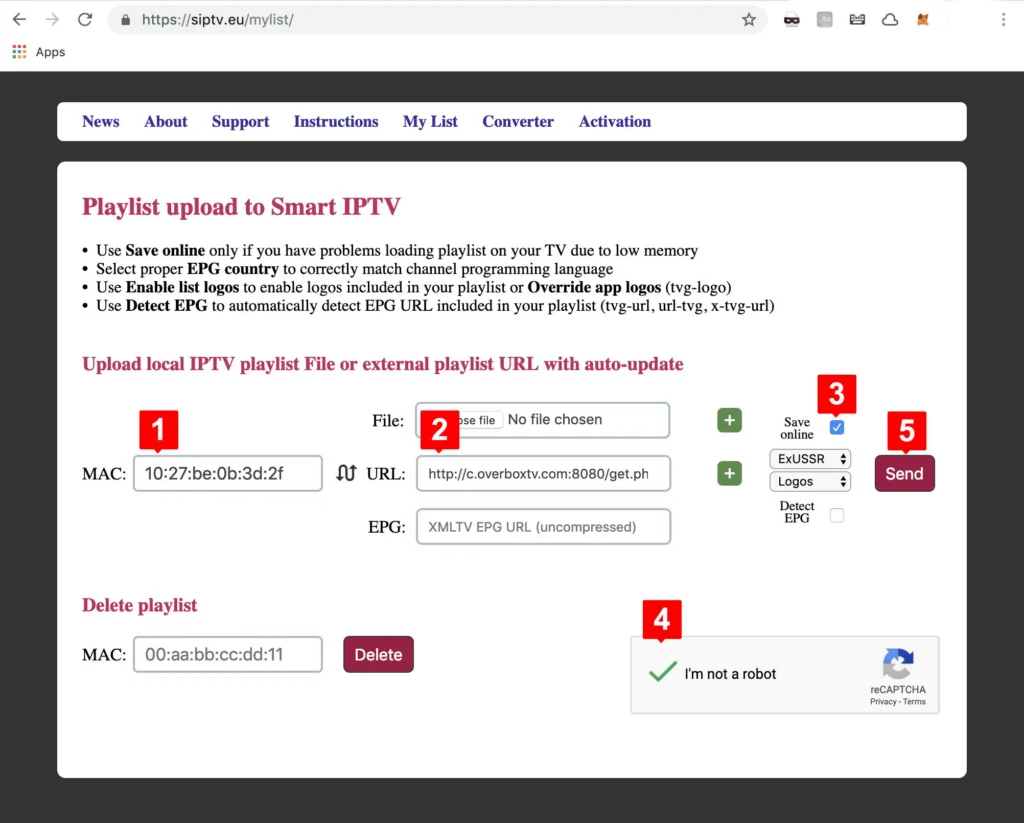
From your computer or smartphone, visit the official website https://siptv.app/mylist/. In the 'Upload playlist to Smart IPTV' section, enter your MAC address in the 'MAC' field, paste your Tvsmarte M3U link into the 'Link' field, check 'Keep online', complete the 'I'm not a robot' captcha, and click 'Send'.
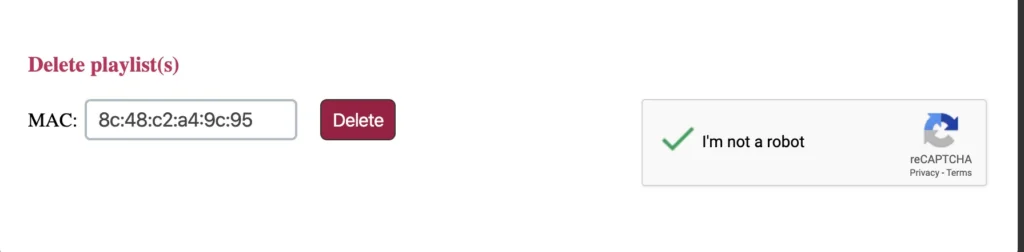
If you previously had an old channel list configured, use the 'Delete playlist' tool on siptv.app to prevent bouquet conflicts. Then return to your TV and press the '0' or 'Reload' button on your remote control to load your Tvsmarte channels.
Your 4K and Full HD live channels, along with the EPG TV guide, will now appear on your screen. Use the blue button on your remote to filter by bouquet (Sports, Cinema, General) and enjoy your favorite programming.
Γρήγορες λύσεις επαληθευμένες από την ομάδα μας για τα συχνά προβλήματα στο Smart IPTV.
Check that your Tvsmarte M3U link was uploaded without leading or trailing spaces on siptv.app. Make sure you checked the 'Keep online' box when uploading.
Smart IPTV provides a 7-day free trial. After that, a one-time lifetime activation fee of €5.49 must be completed on https://siptv.app/activation/ using your MAC address.
In Smart IPTV settings (red button or Options menu), switch the stream type from HLS to MPEG-TS or enable the extended buffer option to smooth out 4K streaming.
Όλα όσα πρέπει να γνωρίζετε για τη χρήση του Smart IPTV με τη συνδρομή σας.
No, Smart IPTV is strictly a media player. To stream TV channels, movies, and series, you must connect an active subscription like Tvsmarte.
No, the Smart IPTV license is strictly tied to the physical MAC address of your TV. Each screen requires its own activation.
Press the blue button on your TV remote to cycle through channel groups (USA, Sports, UK, Canada, Cinema, etc.) provided by Tvsmarte.
Λάβετε τα στοιχεία Xtream Codes και τον σύνδεσμο M3U σε λιγότερο από 5 λεπτά μέσω email και WhatsApp. Δοκιμάστε χωρίς ρίσκο με την εγγύηση επιστροφής χρημάτων 24 ωρών.