Secure Playlist Management
Stream protection backed by a unique Device Key and security PIN to prevent unauthorized modifications.



Learn how to configure Duplex IPTV (DuplexPlay) with your Tvsmarte subscription. Follow our step-by-step tutorial to register your Device ID and Device Key via the official portal and enjoy a fast, sleek interface with favorites and parental controls.
A responsive media player for Android, Windows, and Xbox with advanced audio track and subtitle management.
Stream protection backed by a unique Device Key and security PIN to prevent unauthorized modifications.
Easily toggle between commentary feeds and original audio tracks for movies and live sporting events.
Pick up movies and on-demand TV episodes right where you left off with smart resume.
Følg hvert detaljerte trinn nedenfor for å konfigurere Tvsmarte-strømmene dine i Duplex IPTV.
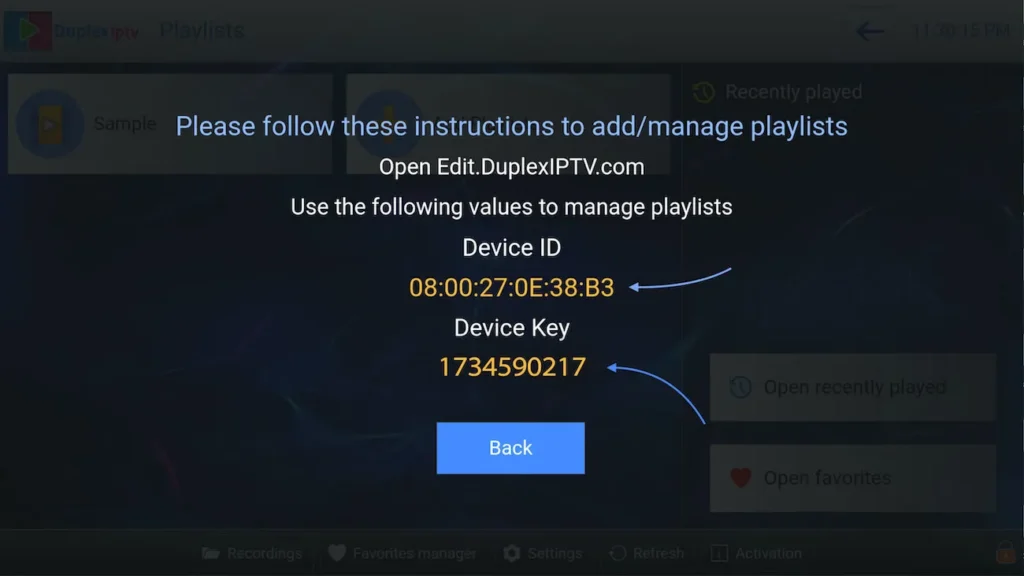
Launch Duplex IPTV on your device. The main screen prominently displays your 'Device ID' and security 'Device Key'. Write down both values.
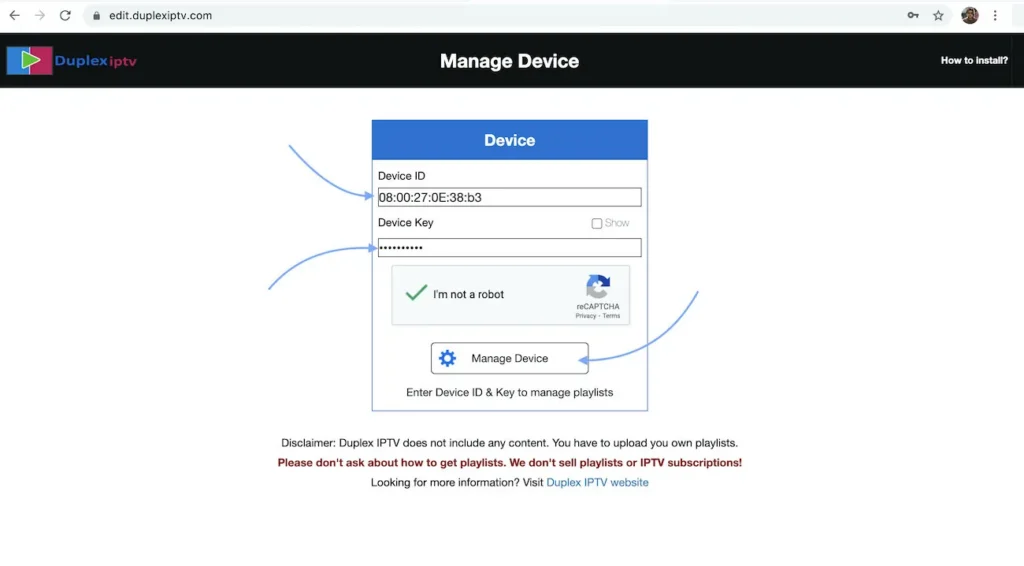
Using your computer or smartphone, navigate to https://edit.duplexiptv.com. Enter your Device ID and Device Key, check the 'I am not a robot' captcha, and click 'Manage Device'.
Once logged in to your device dashboard, click 'Add Playlist'. Label your playlist (e.g., 'Tvsmarte 4K'), paste your complete M3U link into the 'Playlist URL' field, and click 'Save'.
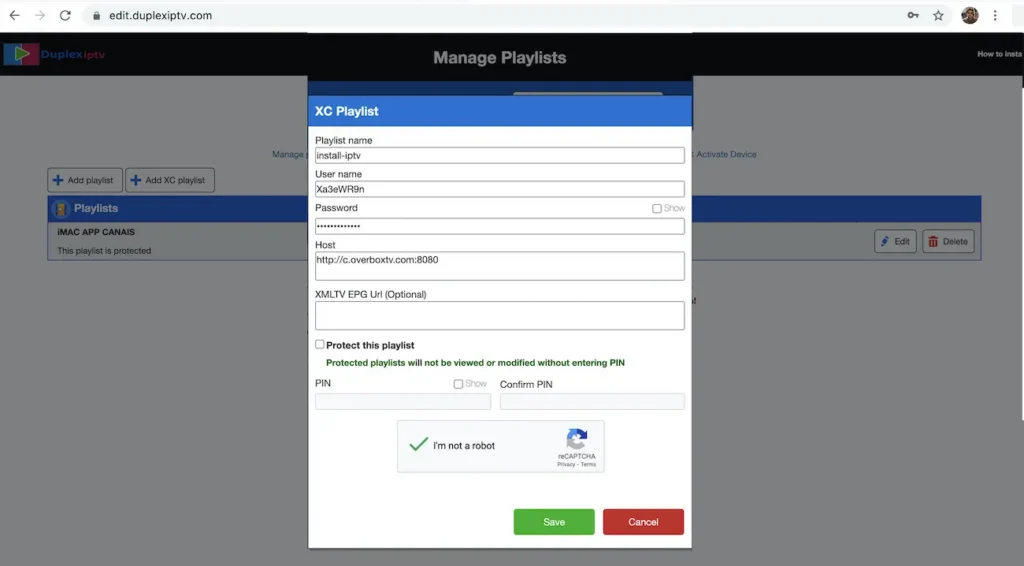
The portal will confirm that your playlist has been saved successfully along with the count of linked channels. These changes are pushed to your app immediately.
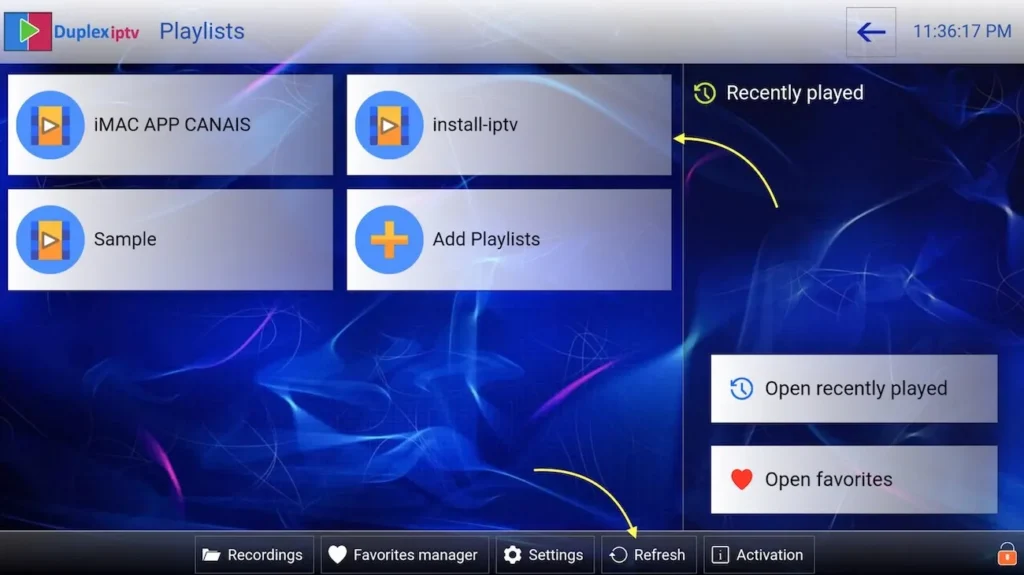
Switch back to the Duplex IPTV app on your TV or PC. Your 'Tvsmarte 4K' folder is now visible on screen. Open it to explore your live bouquets and on-demand video library.
Raske løsninger verifisert av teamet vårt for vanlige problemer med Duplex IPTV.
Keep the Duplex IPTV application open on your screen while logging in, as the Device Key can automatically regenerate if the app restarts.
DuplexPlay costs approximately $1.99 per year. Renewal is handled directly within the app through your platform's app store (Google Play, Microsoft Store).
In Duplex IPTV playback settings, toggle the internal video engine to 'Software decoder' if the hardware decoder runs into codec incompatibilities.
Alt du trenger å vite om å bruke Duplex IPTV med abonnementet ditt.
Yes, DuplexPlay is available on the Microsoft Store and runs natively on Xbox consoles with full wireless controller navigation.
Yes, when adding your playlist on the web portal, you can specify a 4-digit PIN to lock access to adult or sensitive categories.
DuplexPlay has been removed from select regional Samsung and LG app stores. If it isn't listed in your store, consider using a Fire TV Stick or choose Smart IPTV / Set IPTV.
Få Xtream Codes-opplysningene og M3U-lenken din på under 5 minutter på e-post og WhatsApp. Test risikofritt med vår 24 timers pengene-tilbake-garanti.