Multi-Screen & Instant Zapping
Watch up to 4 channels simultaneously in grid view and switch between streams with zero latency thanks to Tvsmarte's Anti-Freeze™ 9.3 infrastructure.



Learn how to install and configure IPTV Smarters Pro with your Tvsmarte subscription. Whether you use a Samsung or LG Smart TV, Android TV box, Fire Stick, iPhone, or Windows PC, follow our step-by-step guide to sync your 4K live channels and VOD libraries using your Xtream Codes API credentials.
An intuitive interface praised by millions of users, fully optimized for Tvsmarte's Xtream Codes protocol.
Watch up to 4 channels simultaneously in grid view and switch between streams with zero latency thanks to Tvsmarte's Anti-Freeze™ 9.3 infrastructure.
Create custom lists for your favorite sports leagues and instantly lock sensitive categories with a PIN code.
Enjoy up to 7 days of catch-up on your favorite shows and browse the complete, continuously updated EPG guide.
Postupujte podle každého podrobného kroku níže a nastavte streamy Tvsmarte v IPTV Smarters Pro.
Download IPTV Smarters Pro directly from the Google Play Store for Android, the App Store for iOS, Samsung Smart Hub for Samsung Smart TVs, or the LG Content Store. On Fire TV Stick, use the Downloader app to get the optimized version. Then launch the application on your screen.
Have your Tvsmarte login details handy, received via email and WhatsApp after your order. If you have a standard M3U link, observe how the server URL, username, and password are structured to fill in the Xtream Codes API.

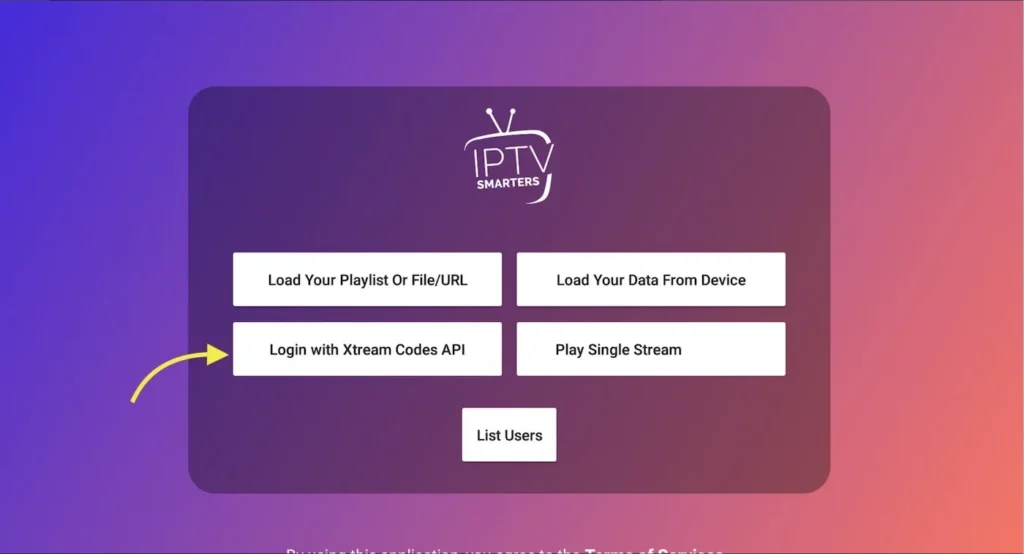
On the IPTV Smarters Pro home screen, choose from multiple connection methods. Click on 'Login with Xtream Codes API'. This method ensures automatic category organization and seamless real-time updates for the 4K catalog.
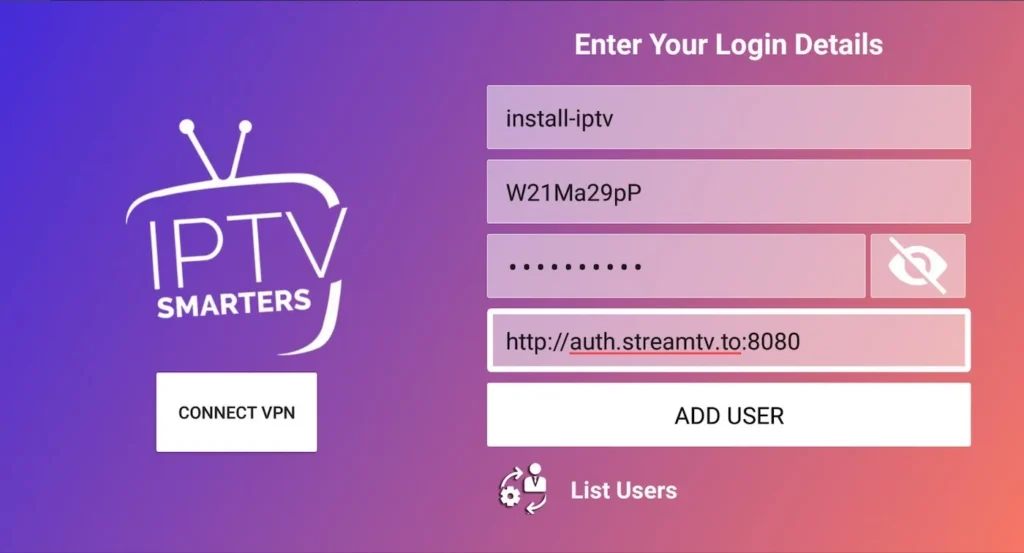
In the form displayed, complete the 4 required fields: enter 'Tvsmarte' in the Name field, your username, your password, and the full server URL provided by our team (e.g., http://server:port). Then click 'ADD USER' to confirm.
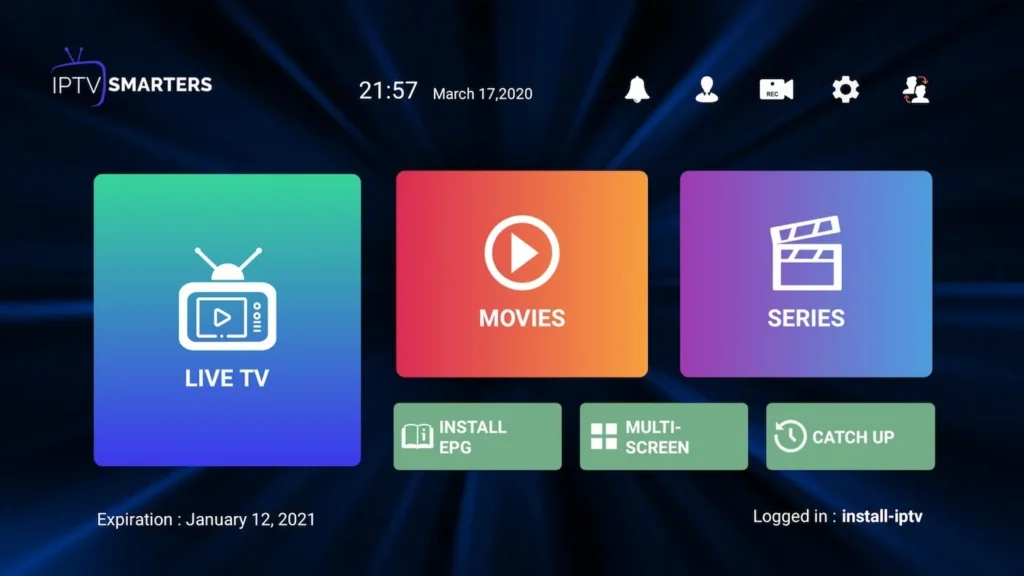
Once loading is complete, access the main IPTV Smarters Pro dashboard. You'll find LIVE TV (4K/FHD live channels), MOVIES (VOD movies), SERIES (full series), and the interactive EPG. Enjoy streaming with Tvsmarte!
Rychlá řešení ověřená naším týmem pro běžné problémy s IPTV Smarters Pro.
Carefully check uppercase and lowercase letters in your password and server URL (watch out for accidental leading or trailing spaces). Make sure your Tvsmarte subscription is active.
In IPTV Smarters Pro settings (gear icon), navigate to 'Stream Format' and select HLS or MPEG-TS. Under 'Player Selection', switch the default player to 'VLC Player' or 'ExoPlayer' for optimal hardware decoding of 4K HEVC codecs.
Click the 'Install EPG' icon from the main menu to force an update of the broadcast schedules. If a time offset persists, adjust the 'Time Shift' setting in the app preferences.
Vše, co potřebujete vědět o používání IPTV Smarters Pro s vaším předplatným.
Yes, the standard version of IPTV Smarters Pro is free and more than enough to stream all your Tvsmarte live channels and VOD. A paid Premium version is available for optional advanced features such as extended multi-screen.
You can install IPTV Smarters Pro on as many devices as you like. However, simultaneous streaming depends on your Tvsmarte plan (such as our Supreme 2 Screens package for two concurrent streams).
The Xtream Codes API is significantly faster, automatically categorizes channels by country and genre, and downloads the EPG program guide without complex setup. We always recommend this method for IPTV Smarters Pro.
From the IPTV Smarters Pro dashboard, navigate to settings and click 'Refresh Channels, Movies & Series' to instantly sync newly added content from our Tvsmarte catalog.
Získejte údaje Xtream Codes a odkaz M3U do 5 minut e-mailem a přes WhatsApp. Vyzkoušejte bez rizika s naší 24hodinovou zárukou vrácení peněz.